
Using the brella to re-create reddit
I started by asking Codex where five message-board demo files should live. The next prompt was three words: “yes do this.” We kept going that way, using each running version and each reply to choose the next request, until the board had a React frontend, boards, a post composer, and CLI commands for its migrations and permissions.
Below are all ten saved prompts, with their replies and the decisions between them. I’ve kept the wording, including the typos. The short follow-ups show how much context a running conversation can carry, and when a screenshot or terminal transcript gives Codex something better to work with.
The app is an example for Mainbrella BFF, our backend on Cloudflare. Each project gets a D1 database storing SQLite data. A trusted Worker checks app grants, user sessions, and row policies before sending SQL to it. Re-creating a small piece of Reddit gives that system some ordinary jobs to get right: read boards, post a message, and keep somebody else from editing it.
The turns are ordered by their saved timestamps across three working directories; the sessions sometimes overlap. Two files contained only the prompt. I recovered their available responses from the original conversation and marked them below. Test totals inside the replies are what Codex reported at the time. The ../../mb paths refer to the local app directory used in those sessions; use your own project directory and identifiers when adapting the commands.
1. Ask where the frontend belongs
My prompt
the demo* files in ./ are going to get much bigger and become a full size react frontend webapp. Where in this repo should we move them? They are not really a "app" like the apps in ../../ but it needs to be closer to root i think
Codex’s reply
I’d use examples/message-board/ at the repo root, with its own npm workspace and React/Vite setup.
canopy/
  apps/                  # platform products and services
  packages/              # shared libraries
  examples/
    message-board/
      package.json
      index.html
      vite.config.ts
      src/
        main.tsx
        App.tsx
        api.ts
        styles.css
The distinction is ownership: apps/bff implements the backend product; this frontend demonstrates building an application using that product. examples/ can hold a complete, maintained application regardless of size.
For the move:
- Move all five demo* files together, giving them normal application filenames.
- Keep backend session handlers and authorization in apps/bff/worker.
- Register examples/message-board in the root npm workspaces.
- Update the current apps/web integration, which loads the demo through BFF’s package exports. The public /bff/demo/ URL can stay.
If it becomes an independent customer-facing product, apps/<product-name>/ would then fit the repo’s conventions.
This prompt gives Codex a decision to make and the tension behind it. The files will grow into a React app, but they demonstrate the backend rather than implement a platform product. I point at the existing repository layout instead of prescribing a new architecture.
The reply proposes a concrete destination and names what would move with it. It also keeps session issuance and authorization in the backend. That was enough to make the next request tiny.
2. Accept the proposal
My prompt
yes do this
Codex’s last progress update (recovered)
The source move and React conversion are complete, including login, search, editing, and logout. I’m validating the standalone and site builds now, then checking the browser flows, especially draft preservation after denied edits and responses arriving after logout.
This is the last available progress update from that turn. The original conversation records an interruption before a final reply, and the saved prompt file contains no reply. I’m leaving that gap visible. “I’m validating” isn’t a claim that validation finished.
The move and the current workspace show the resulting structure: examples/message-board has its own React entry, Vite server, build, and tests. The website composes the same application at /bff/demo/. The example consumes the public BFF API without importing the service’s authorization implementation.
The behavior worth preserving was already visible in the earlier SQLite row-level security demo. Alice can try Bob’s Edit button, but the backend refuses the save and the editor keeps her draft. This earlier capture shows that requirement:
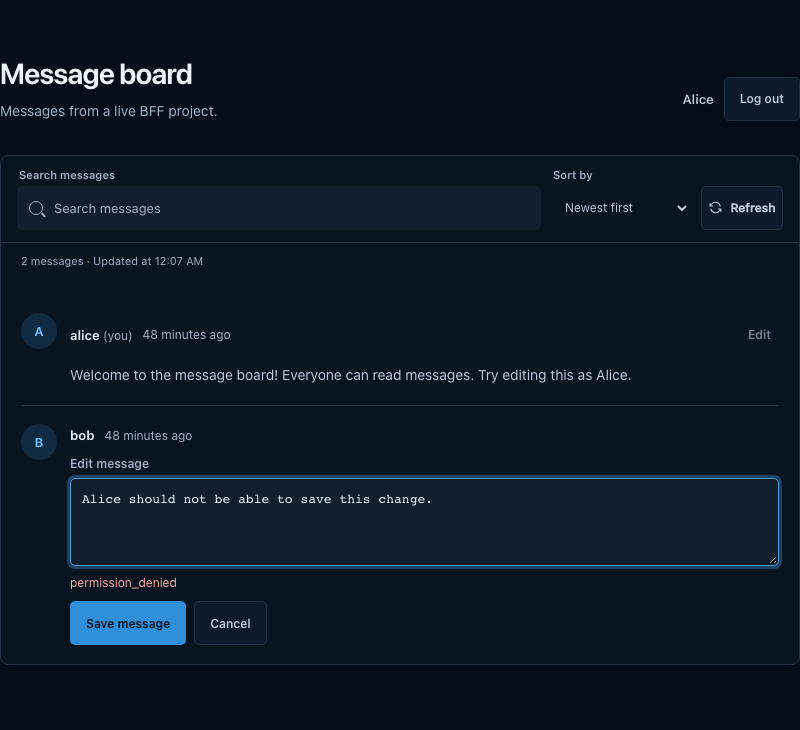
The next prompt reports that the app works locally. That moves the conversation from where the code lives to how it reaches the deployed site.
3. Ask how the moved pieces ship
My prompt
it works locally. How do I deploy this dir and ../../web and also this new examples dir?
Codex’s reply (recovered)
One command deploys all three, from your current directory or the repo root:
npm run deploy -w @canopy/bffIt applies database migrations, deploys the shared API, then builds and publishes the website—including this directory’s BFF pages and
examples/message-boardat https://mainbrella.com/bff/demo/.For frontend changes only:
npm run deploy:site -w @canopy/webThe example has its own development server and build, but currently ships inside the website deployment. It doesn’t need a separate deploy command.
This final reply was recovered from the original conversation; it wasn’t appended to the saved prompt file. It answers the uncertainty the move created: three source directories don’t require three deployments. BFF is composed into the shared API, and the example ships with the website.
The deployment script runs the backend release before the site release. That order lets the API arrive before the frontend that needs it. Its migrations update the shared platform database; an app project’s schema files use the separate migration command we add below. This exchange gives deployment instructions; it doesn’t show a deployment being run.
Once the frontend had a home and a shipping path, the next product change was to give messages somewhere more specific to belong.
4. Describe the data invariant
My prompt
read ./migrations/* and lets make the 002 second one to change it more like reddit where there are boards and each board has a slug, a name, desc, and messages inside just that board. don't worry about mods or replies yet. but every message should belong to one board
Codex’s reply
Added 002_boards.sql:
- Boards have unique slugs, names, and descriptions.
- Every message requires a valid
board_id.- Existing messages move to
general, preserving their data.All 11 tests, type checking, and the BFF SQL scanner check pass. Prompt and reply saved.
The prompt names the files to inspect, the next migration number, the fields to add, and the features to leave out. “Every message should belong to one board” gives Codex a requirement that can be checked in SQLite, even if somebody bypasses the form.
Migration 002 creates boards with unique slugs and nonblank names. Slugs allow lowercase letters, digits, and hyphens, with no leading or trailing hyphen. For existing messages, it creates General and rebuilds the table with board_id TEXT NOT NULL REFERENCES boards(id).

The important copy preserves the old IDs, authors, bodies, and timestamps. These lines omit the table declarations and indexes:
INSERT INTO messages_with_boards
  (id,board_id,user_id,body,created_at)
SELECT id,'general',user_id,body,created_at
FROM messages;

DROP TABLE messages;
ALTER TABLE messages_with_boards RENAME TO messages;
New messages have to specify a board; there’s no default silently sending them to General. The migration tests preserve the old data and reject missing, null, or nonexistent board IDs. An index on (board_id,created_at) supports listing a board’s messages in time order.
Now we had a SQL file. I wanted to apply it from the app directory without repeatedly copying SQL into an admin screen.
5. Ask for an operation you can repeat
My prompt
lets setup a new --migrate option to run from ../../mb and look for a dir migrations and then find the next sequence from _bff_migration table to run. This is a change to this cli rust code but also we may need to look at ../apps/bff and see if there is api endpoint for this
Codex’s reply
Implemented
--migrateusing the existing BFF API and_bff_migrations. It applies pending SQL files in sequence and stops on failure. Addedcanopy.jsonfor../../mb.From this CLI directory, with
MAINBRELLA_API_KEYset:cargo install --path . cd ../../mb canopy --migrateValidation passed: 12 Rust tests, 7 BFF/example tests, build, formatting, and clippy. Prompt and reply saved. No live migrations run.
I called the ledger _bff_migration in the prompt. The existing table is _bff_migrations, which the reply correctly uses. Pointing Codex at the backend and asking it to look for an endpoint let it resolve that detail from the repository.
The Rust change uses the existing GET and POST /bff/projects/{projectId}/migrations endpoints. It reads canopy.json for the project ID, sorts numeric migration prefixes, checks the latest applied sequence, and submits pending files in order. Duplicate sequences or names, gaps, empty SQL, and oversized files fail local validation before submission.
The server stores the sequence, name, checksum, SQL, and application time in the ledger. Its ledger insert and the migration statements share one D1 transaction, so a failed backfill must not leave a success entry behind. Matching retries are accepted; conflicting submissions for an existing sequence or name are rejected.
There are two limits to carry into your own workflow. Earlier successful migrations stay applied if a later file fails. Already-applied files are skipped by sequence, so editing one locally won’t update its database. Add another migration. Also keep the owner’s MAINBRELLA_API_KEY in the environment, outside canopy.json and frontend code.
Notice the reply’s last sentence: “No live migrations run.” Codex had made the command, not applied the data change. With that operation available, the next UI request could use the new board relationship.
6. Give the screenshot a smaller scope
My prompt
in the upper right add a + create button and make it show full screen modal like [Image #1] and get the list of boards to popular the top select drop down that shows r/SQL in the screenshot. use "board/:slug" for ours. Make the UI with title required, ignore flair, and body is required but ignore the rich text options just plain text for now. Ignore save draft just have post button and when saving do the insert into messages with the body and just ignore title for now
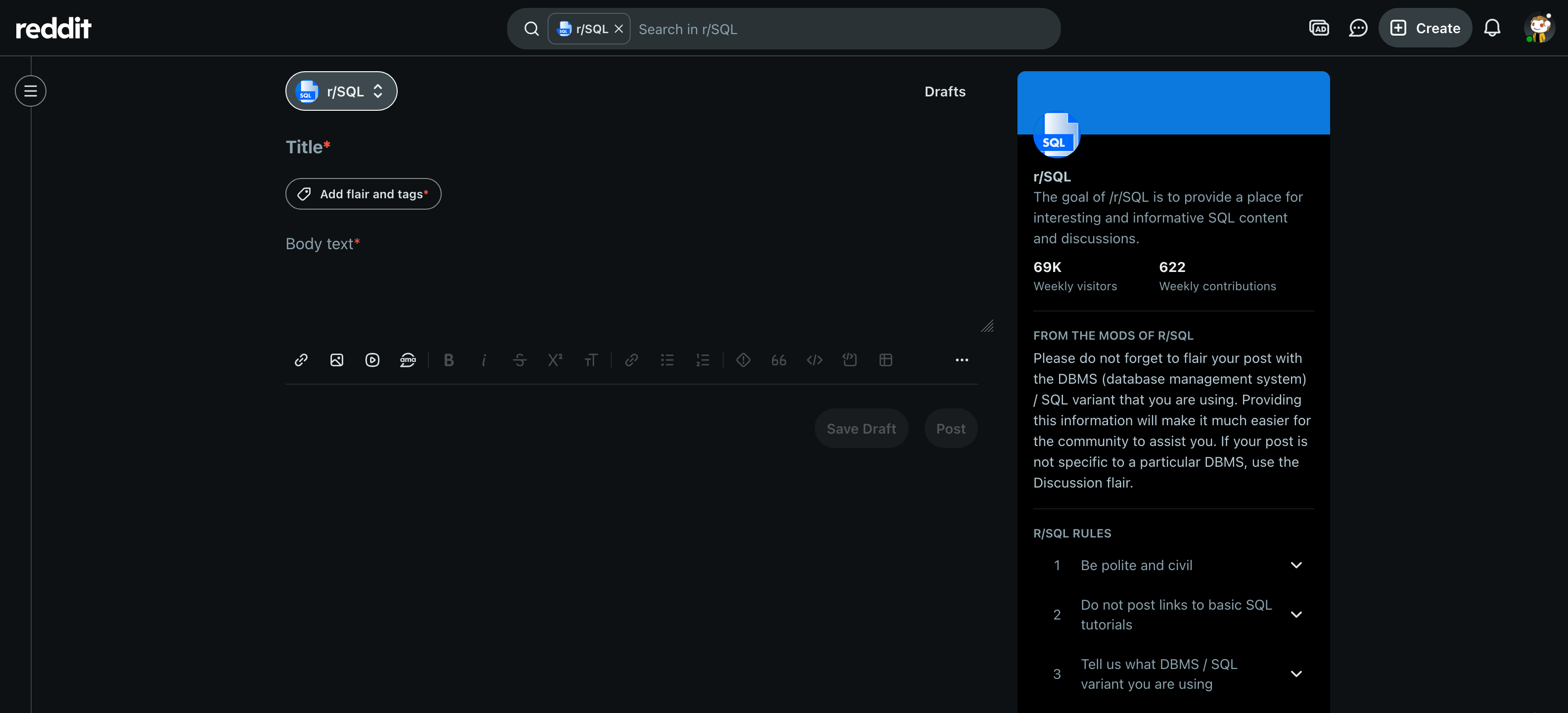
Codex’s reply
Added + Create with a full-screen composer, a dropdown populated from the boards API as
board/:slug, and required title/body. Post saves the board, user, and body; title is ignored.All 14 tests, build, and browser checks at four sizes pass. Prompt/reply saved.
Live board reads return
permission_denied; backend permissions need enabling before live use.
The image supplies the layout. The words choose which behavior to implement: load real boards, label them board/:slug, require plain text, and insert into messages. Saying what to ignore keeps the screenshot from becoming a request for every feature it contains.
There’s also a deliberate shortcut I’d change before shipping a finished posting experience: the form requires a title but discards it. The current API client sends only board_id, user_id, and the trimmed body. Keeping the prompt and reply makes that omission easy to explain later.
The client fetches boards in pages of 100, ordered by slug, because the Data API caps each read at 100 rows. The dialog preserves drafts after failed posts and provides retry for a failed board load. Those states matter more here than copying Reddit’s formatting tools.
The reply identifies the next problem for us: the UI can request boards, but the deployed backend denies the read. More frontend styling won’t get that dropdown its data.
7. Show the missing policy
My prompt
good now look at [Image #1] and notice we are missing a row for a new table added by migration. Let's add a cli option to give Read everyone to a new table
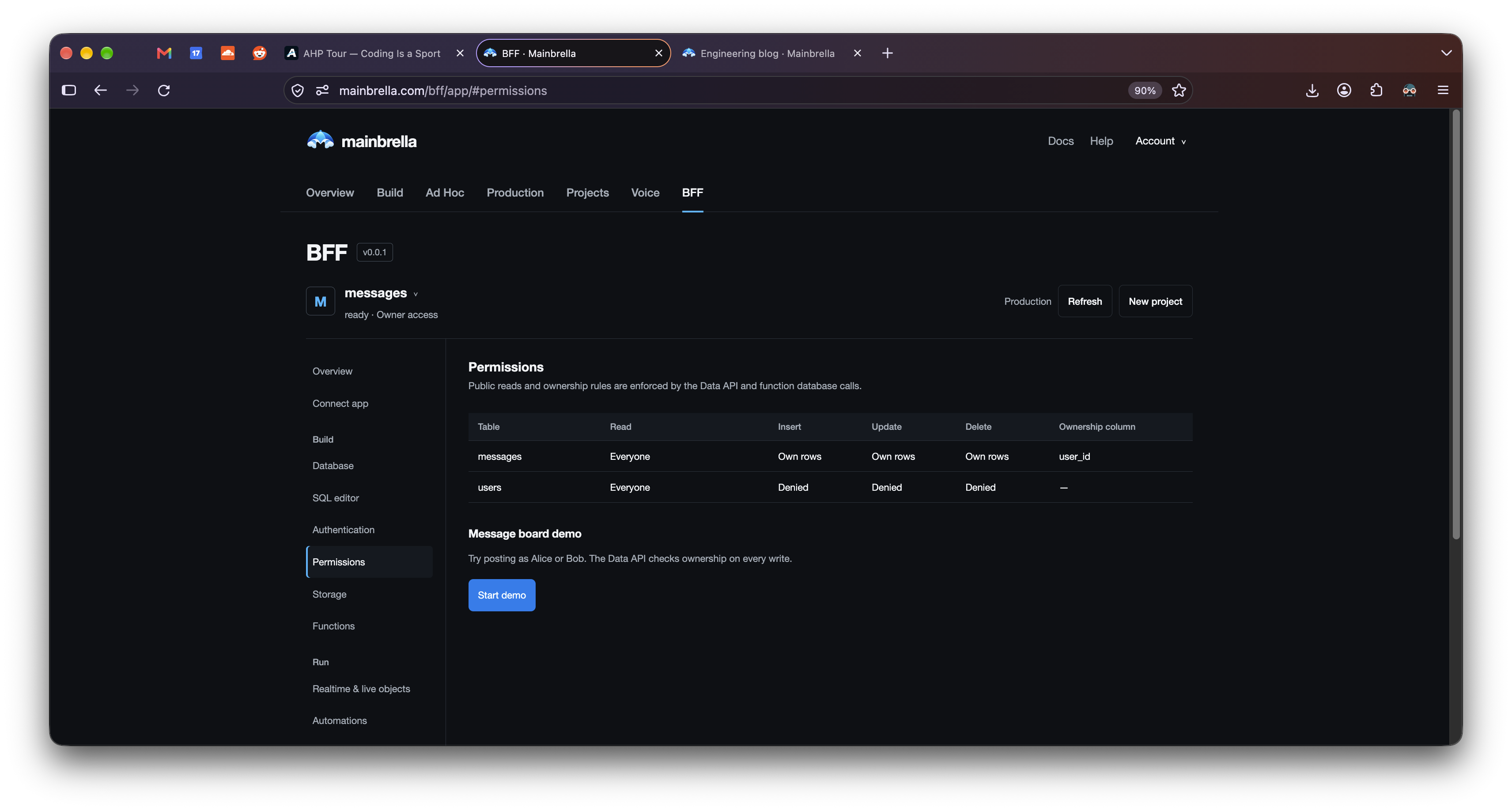
Codex’s reply
Added
--read-everyone <TABLE>. After updating your installed CLI, run from../../mb:canopy --read-everyone boardsThis creates the policy row with Read: Everyone, preserving existing write rules. Refresh BFF Permissions afterward. Browser keys also need a
selectgrant forboards.All 18 Rust tests and 8 BFF tests passed, along with build and clippy. No live permissions changed.
Creating a table in a project’s D1 database doesn’t create its access policy. The new CLI command reads the existing policy and sets its read access to public. Existing write rules and the owner column survive; a new policy denies writes.
The reply’s second requirement is easy to miss. The table policy and the browser-key grant are separate checks, stored in the gateway’s bff_table_policies and bff_api_key_grants metadata. A read needs both:
| Key grants boards:select | Boards policy permits public reads | Read result* |
|---|---|---|
| No | No | Denied |
| Yes | No | Denied |
| No | Yes | Denied |
| Yes | Yes | Allowed |
*Assuming a valid key, an allowed origin, and an available project. Signed-in requests also need a valid session.
A public policy can’t widen a key that lacks access, and a key grant can’t override a denied table policy. This explains why the next prompt simply picks up the unfinished requirement from Codex’s reply.
8. Turn the reply’s qualification into the next task
My prompt
let's work on the
Browser keys also need a select grant for boards. part now
Codex’s reply
Added:
canopy --browser-keys
canopy --grant-select boards --key <KEY_ID>
Run from
../../mband select the ID of your app’s existing browser key. This addsselectwhile preserving its token and other grants.Requires deploying the new BFF endpoint and updating the installed CLI. No live grants changed.
Passed: 21 Rust tests, 26 BFF tests, 49 API tests, type checks, build, and clippy.
This prompt is a fragment of the previous answer. It works in that conversation because the table, app, project, and CLI are already established. In a fresh session I’d include those paths and say that boards has a public policy but the existing browser key needs a select grant.
The change adds key listing and a grant endpoint. The list shows IDs, names, safe prefixes, origins, table grants, and pinned function versions. The update preserves the browser token and its other settings. There’s no reason to replace every frontend key just to let the app read another table.
The endpoint appends to the current JSON grant document in one SQL update using SQLite’s JSON functions. A client-side read, change, and replacement could lose a concurrent grant. Doing the append at the server also avoids duplicate grants and checks that the key still belongs to the project.
Again, implementing the command doesn’t apply the configuration. The reply calls out both the updated API deployment and the installed CLI. The next saved product report says reads are working, then gives us a different denied operation.
9. State the behavior, even if your diagnosis is wrong
My prompt
it's working now. Next issue - You don’t have permission to post to this board. - we need to set the Ownership column in a way so anyone can post a new message to any board. But when we get to creating boards that Ownership column should be user_id so only the creater of a board can edit or delete it. But anyone should be able to insert into messages with any board id
Codex’s reply
Your key was missing
messages: insert. Added--grantand--own-rowsto configure this.After deploying the updated API and rebuilding the CLI, run from
../../mb:canopy --own-rows messages --owner-column user_id canopy --grant messages insert --key 673cfd0a-65b7-4029-b823-fca7733e7a96 canopy --migrate canopy --own-rows boards --owner-column user_idSigned-in users can post to any existing board. Messages use the author’s
user_id; boards use the creator’suser_idfor edits and deletes.Migration
003_board_owners.sqladds board ownership. Existing boards remain unassigned.Rust, BFF, message-board, and API checks passed. No live permissions changed.
I suspected the ownership column, but the browser key had only messages: select, update. It was missing insert. Changing the owner column wouldn’t get that request past the key check. The prompt was still useful because it described what should be possible independently of that diagnosis.
The repair keeps messages.user_id as the author and generalizes the grant command to select, insert, update, and delete. --own-rows sets all three write policies to own while preserving the read policy. The key grant enables the requested operation; the row policy determines whose data that operation can change.
The frontend sends its app key in apikey and the user session in Authorization: Bearer <userToken>. The app key limits operations; it doesn’t identify Alice. The Worker verifies the session’s project and expiry before using its user identity.
For an insert, the trusted Worker fills an omitted author from that session and rejects a different supplied author. For an update, it adds the author condition to the mutation itself. Alice’s attempt to change Bob’s row without supplying an author has this shape:
UPDATE "messages" SET "body"=?
WHERE "id" IS ? AND "user_id" IS ?
RETURNING *
-- Parameters: ["Alice’s edit", "reply", "alice"]
Bob’s row doesn’t match, so nothing changes. Supplying Bob’s user_id explicitly is rejected with HTTP 403 before SQL is sent. The ownership check belongs in the same statement as the update, rather than a separate read that could become stale.
Board ownership is a different relationship. Migration 003 adds nullable boards.user_id references and an index. It has to run before configuring that ownership column, because the backend checks the column exists. Existing boards remain unassigned. Configuring the board policy doesn’t give the browser key board-write grants; those are still needed when the frontend adds board management.
The integration test lets Alice post in Bob’s board and Bob post in Alice’s board. Each can edit their own message there; neither can edit the other person’s board or forge authorship. Each table’s policy checks its own user_id. The message policy doesn’t consult the board’s owner.
Custom JavaScript must follow those rules too. A backend function can call ctx.db.update('messages', { id: input.id }, { body: input.body.trim() }) without writing its own author filter. For app callers, that capability passes through the same authorization code as direct HTTP requests. Customer functions run in fresh Dynamic Workers with an empty environment and globalOutbound: null; they receive narrow database methods, not a raw-SQL method or our Cloudflare credentials.
D1 will execute the SQL the trusted gateway sends. A route that bypassed these checks would be a security bug, which is why this board is useful to keep testing as the backend grows. The next saved file captures a more mundane problem while putting the CLI commands to use.
10. Paste the command and its output
My prompt
~/mainbrella/mb (main)[146dcbf9] $ canopy --browser-keys
Browser keys (1)

Frontend app (673cfd0a-65b7-4029-b823-fca7733e7a96) — bff_pk_1f9bb9fd
  Origins: http://localhost:5173, https://mainbrella.com
  Table grants:
    messages: select, update
  Function grants: none
~/mainbrella/mb (main)[146dcbf9] $ canopy --grant-select boards --key bff_pk_1f9bb9fd
error: invalid browser key ID 'bff_pk_1f9bb9fd': expected a lowercase UUID

Usage: canopy [OPTIONS]
~/mainbrella/mb (main)[146dcbf9] $ canopy --grant-select boards --key 673cfd0a-65b7-4029-b823-fca7733e7a9
error: invalid browser key ID '673cfd0a-65b7-4029-b823-fca7733e7a9': expected a lowercase UUID

Usage: canopy [OPTIONS]
Codex’s reply
Your second command is missing the final
6from the key ID. Thebff_pk_…value is the key’s prefix.
No elaborate explanation was needed here. The transcript contains the ID, the safe display prefix, both commands, and both errors. Codex can compare what I passed with what the CLI printed. The second attempt is missing the final 6; the first uses a prefix where the command expects a full UUID.
Both fail local argument validation before a request reaches BFF. There’s no permission-engine change to make. This final saved exchange doesn’t include a successful rerun, so it establishes the input mistake rather than proving a live grant was applied.
When you hit a failure, copy this much context. A screenshot of “invalid key” or a prompt saying “the command doesn’t work” would have thrown away the information that made this a one-sentence answer.
Choosing the next prompt
The board still lists messages together, requires a title it doesn’t store, and has no board-management controls, replies, votes, or moderation. The permission engine supports public or denied reads and own-row writes; private boards would need more than this policy system currently offers.
I’d make title persistence the next small request. This is a new example prompt, not another saved turn:
Read the message-board migrations, composer, and API client. The form requires a title but doesn’t save it. Add the next migration and update posting and display so titles survive a reload. Preserve existing messages and their board and author IDs. Follow the existing validation patterns, test old and new rows, and report any deployment or migration steps still needed.
That prompt starts from a visible defect, points at the code that carries the context, and says what must survive. We used the same ingredients for boards, migrations, and grants. Keep durable repository conventions in AGENTS.md, which Codex reads as project guidance; use the task itself for the next behavior you want. A screenshot supplies layout, but it still needs words describing the behavior it can’t show.
These exchanges got useful work done because the next prompt had something concrete behind it: a proposed file move, a working local page, a missing permission row, or the exact command that failed. The running board kept supplying the next question. Codex could write the change while I kept choosing what the app should do and checking the request it should refuse.